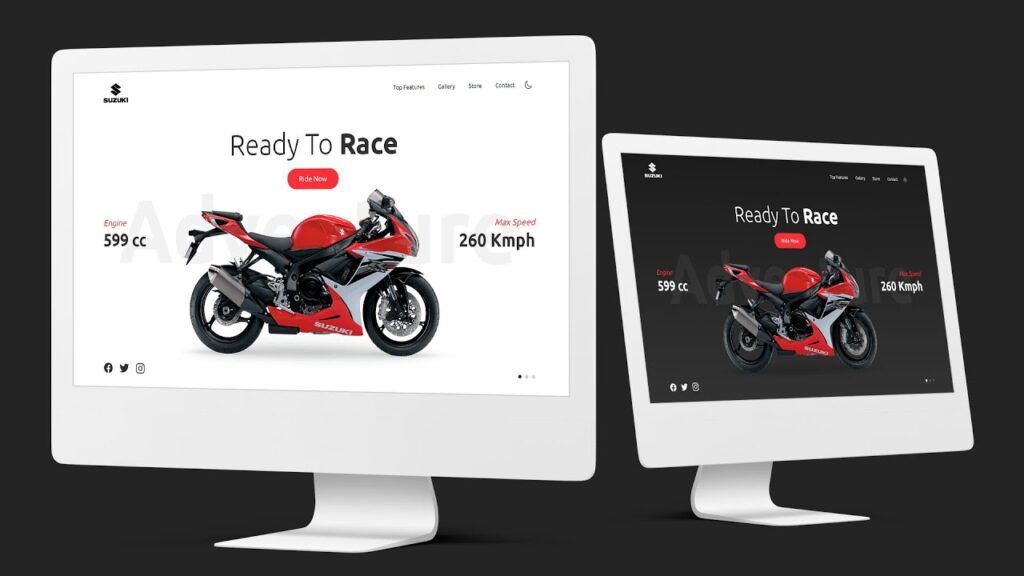

Introduction to Responsive Website Design
Responsive Web Design (RWD) ensures that websites adjust dynamically to different screen sizes, making them mobile-friendly.
Why is Responsive Design Important?
- Improves User Experience: Ensures smooth navigation on all devices.
- SEO Benefits: Google prioritizes mobile-friendly websites.
- Increases Conversion Rates: A seamless experience leads to better engagement.
Core Principles of Responsive Web Design
- Fluid Layouts: Use relative units (
%, em, vw, vh) instead of fixed widths. - Flexible Images: Ensure images resize dynamically using
max-width: 100%. - Media Queries: Customize layouts based on screen sizes.
Setting Up a Responsive HTML Structure
Basic HTML Template
Table of Contents
<!DOCTYPE html>
<html lang="en">
<head>
  <meta charset="UTF-8">
  <meta name="viewport" content="width=device-width, initial-scale=1.0">
  <title>Responsive Website</title>
  <link rel="stylesheet" href="style.css">
</head>
<body>
  <header>
    <h1>Welcome to Our Responsive Website</h1>
  </header>
</body>
</html>
<meta name="viewport" content="width=device-width, initial-scale=1.0"> ensures proper scaling on all devices.
CSS Basics for Responsive Web Design
Using CSS Variables for Theming
:root {
  --primary-color: #f83038;
  --background-color: #222;
  --text-color: #fff;
}
body {
  background: var(--background-color);
  color: var(--text-color);
}
- CSS variables make styling easier and reusable.
Understanding Media Queries in CSS
Breakpoints for Different Devices
@media (max-width: 768px) {
  body {
    background: #f0f0f0;
  }
}
@media (max-width: 480px) {
  body {
    background: #ddd;
  }
}
- Media queries allow different styles for different screen sizes.
Creating a Responsive Navigation Bar
Mobile-Friendly Menu
.navbar {
  display: flex;
  justify-content: space-between;
}
@media (max-width: 768px) {
  .navbar {
    flex-direction: column;
  }
}
Hamburger Menu Example
const menuToggle = document.querySelector('.menu-toggle');
const navigation = document.querySelector('.navigation');

menuToggle.addEventListener('click', () => {
  navigation.classList.toggle('active');
});
- JavaScript toggles the navigation menu on small screens.
Implementing Dark & Light Mode in Web Design
CSS Implementation
:root {
  --background-dark: #222;
  --background-light: #fff;
}
.light-mode {
  background: var(--background-light);
}
JavaScript for Theme Switching
const themeToggle = document.querySelector('.theme-toggle');
themeToggle.addEventListener('click', () => {
  document.body.classList.toggle('light-mode');
});
- Allows users to switch between light and dark themes.
Using CSS Flexbox for Responsive Layouts
Basic Flexbox Layout
.container {
  display: flex;
  flex-wrap: wrap;
}
.item {
  flex: 1;
}
- Flexbox simplifies responsive grid systems.
Using CSS Grid for Advanced Layouts
Creating a Grid Layout
.grid-container {
  display: grid;
  grid-template-columns: repeat(auto-fit, minmax(200px, 1fr));
}
- Automatically adjusts columns based on screen size.
Responsive Image Optimization
Using max-width for Fluid Images
img {
  max-width: 100%;
  height: auto;
}
- Ensures images scale without distortion.
Practical Project: Building a Responsive Bike Landing Page
HTML Structure
<section class="main">
  <header>
    <a href="#"><img src="logo.png" class="logo"></a>
    <nav>
      <ul>
        <li><a href="#">Top Features</a></li>
        <li><a href="#">Gallery</a></li>
      </ul>
    </nav>
  </header>
  <div class="content">
    <h2>Ready To <span>Race</span></h2>
    <a href="#" class="btn">Ride Now</a>
  </div>
</section>
CSS for Responsiveness
@media (max-width: 768px) {
  .content h2 {
    font-size: 2rem;
  }
}
Adjusts text size for mobile devices.
What is the best way to make a website responsive?
Using a combination of fluid layouts, flexible images, and media queries ensures full responsiveness.
How do media queries work?
Media queries apply different styles depending on screen size and device type.
Can I use Bootstrap for responsiveness?
Yes, Bootstrap provides a grid system and pre-built responsive components.
What are the best breakpoints for responsive design?
Common breakpoints:
Mobile: max-width: 480px
Tablet: max-width: 768px
Desktop: min-width: 1024px
How do I test my website’s responsiveness?
You can use:
Google Chrome DevTools (Inspect > Responsive Mode)
Online tools like Responsinator
Full HTML Code of Responsive Website Design
<!DOCTYPE html>
<html lang="en">
<head>
  <meta charset="UTF-8">
  <meta name="viewport" content="width=device-width, initial-scale=1.0">
  <title>Responsive Suzuki Bike Website Landing Page with Dark & Light Mode</title>
  <link rel="stylesheet" href="style.css">
</head>
<body>
  <section class="main">
    <header>
      <a href="#"><img src="logo.png" class="logo"></a>
      <div class="group">
        <div class="toggle"></div>
        <ul class="navigation">
          <li><a href="#">Top Features</a></li>
          <li><a href="#">Gallery</a></li>
          <li><a href="#">Store</a></li>
          <li><a href="#">Contact</a></li>
        </ul>
        <div class="dayNight">
          <ion-icon name="sunny-outline" class="active"></ion-icon>
          <ion-icon name="moon-outline"></ion-icon>
        </div>
      </div>
    </header>
    <div class="content">
      <h2>Ready To <span>Race</span></h2>
      <a href="#" class="btn">Ride Now</a>
      <img src="bike.png" class="bike">
    </div>

    <!-- Slider Content-->
    <div class="slider">
      <div class="slides active">
        <h2><span>Engine</span><br>599 cc</h2>
        <h2><span>Max Speed</span><br>260 Kmph</h2>
      </div>
      <div class="slides">
        <h2><span>Mileage</span><br>14 Kmpl</h2>
        <h2><span>0-100 Kmph</span><br>4 Seconds</h2>
      </div>
      <div class="slides">
        <h2><span>Wheels</span><br>17-Inch Alloy</h2>
        <h2><span>Tyre Type</span><br>Tubeless</h2>
      </div>
    </div>

    <div class="footer">
      <ul class="sci">
        <li><a href="#"><ion-icon name="logo-facebook"></ion-icon></a></li>
        <li><a href="#"><ion-icon name="logo-twitter"></ion-icon></a></li>
        <li><a href="#"><ion-icon name="logo-instagram"></ion-icon></a></li>
      </ul>
      <div class="dots">
        <span class="dot active"></span>
        <span class="dot"></span>
        <span class="dot"></span>
      </div>
    </div>
  </section>

  <script type="module" src="https://unpkg.com/ionicons@5.5.2/dist/ionicons/ionicons.esm.js"></script>
  <script nomodule src="https://unpkg.com/ionicons@5.5.2/dist/ionicons/ionicons.js"></script>

  <script>
    // Day Night Mode
    const dayNight = document.querySelector('.dayNight');
    const body = document.querySelector('body');
    dayNight.onclick = function(){
      dayNight.classList.toggle('active');
      body.classList.toggle('light')
    }

    // Navigation
    const toggle = document.querySelector('.toggle');
    const navigation = document.querySelector('.navigation');
    toggle.onclick = function(){
      toggle.classList.toggle('active');
      navigation.classList.toggle('active');
    }

    // Slider
    const slides = document.querySelectorAll('.slides');
    const dots = document.querySelectorAll('.dot');

    function setActive(i){
      for(slide of slides)
      slide.classList.remove('active');
      slides[i].classList.add('active');
      for(dot of dots)
      dot.classList.remove('active');
      dots[i].classList.add('active');
    }

    for(let j =0; j<dots.length; j++){
      dots[j].addEventListener('click', function(){
        setActive(j)
      })
    }
  </script>
</body>
</html>
Full CSS Code of Responsive Website Design
@import url('https://fonts.googleapis.com/css2?family=Ubuntu:wght@300;400;500;700&display=swap');
*
{
  margin: 0;
  padding: 0;
  box-sizing: border-box;
  font-family: 'Ubuntu', sans-serif;
}
:root
{
  --black: #2f2f2f;
  --white: #fff;
  --red: #f83038;
}
.light
{
  --black: #fff;
  --white: #2f2f2f;
  --red: #f83038;
}

.main
{
  position: relative;
  min-height: 100vh;
  background: linear-gradient(#1c1c1c,#323232);
  padding: 30px 100px;
  display: flex;
  justify-content: center;
  align-items: center;
  flex-direction: column;
}
.light .main
{
  background: #fff;
}
.main::before
{
  content: 'Adventure';
  position: absolute;
  top: 50%;
  left: 50%;
  transform: translate(-50%,-50%);
  font-size: 16vw;
  font-weight: 700;
  color: rgba(255,255,255,0.05);
}
.light .main::before
{
  color: rgba(0,0,0,0.05);
}
header
{
  position: absolute;
  top: 0;
  left: 0;
  width: 100%;
  padding: 30px 100px;
  display: flex;
  justify-content: space-between;
  align-items: center;
}
.logo
{
  max-width: 80px;
}
.light .logo
{
  filter: invert(1);
}
.navigation
{
  display: flex;
}
.navigation li
{
  list-style: none;
}
.navigation li a
{
  position: relative;
  color: var(--white);
  margin-left: 40px;
  text-decoration: none;
  transition: 0.25s;
}
.navigation li a:hover
{
  color: var(--red);
}
.content
{
  position: relative;
  display: flex;
  justify-content: center;
  align-items: center;
  flex-direction: column;
  margin-top: 100px;
  z-index: 1;
}
.content h2
{
  font-size: 5em;
  font-weight: 300;
  color: var(--white);
  text-align: center;
}
.content h2 span
{
  font-weight: 700;
}
.btn
{
  display: inline-block;
  background: var(--red);
  color: var(--white);
  text-decoration: none;
  padding: 16px 36px;
  margin-top: 20px;
  border-radius: 50px;
  font-size: 1.25em;
  transition: 0.25s;
}
.light .btn
{
  color: #fff;
}
.btn:hover
{
  letter-spacing: 4px;
}
.bike
{
  max-width: 80%;
}
.footer
{
  position: absolute;
  bottom: 0;
  width: 100%;
  padding: 30px 100px;
  display: flex;
  justify-content: space-between;
  align-items: center;
}
.sci
{
  display: flex;
}
.sci li
{
  list-style: none;
}
.sci li a
{
  color: var(--white);
  font-size: 2em;
  margin-right: 20px;
  transition: 0.25s;
}
.sci li a:hover
{
  color: var(--red);
}
.dots
{
  display: flex;
}
.dots .dot
{
  width: 10px;
  height: 10px;
  background: rgba(255,255,255,0.2);
  border-radius: 50%;
  cursor: pointer;
  margin-left: 10px;
}
.light .dots .dot
{
  background: rgba(0,0,0,0.2);
}
.dots .dot.active
{
  background: var(--white);
}
.slider .slides
{
  position: absolute;
  top: 60%;
  left: 0;
  transform: translateY(-50%);
  z-index: 10;
  width: 100%;
  display: flex;
  justify-content: space-between;
  padding: 0 100px;
  transition: 0.25s;
  opacity: 0;
  pointer-events: none;
}
.slider .slides.active
{
  opacity: 1;
  top: 50%;
}
.slider .slides h2
{
  color: var(--white);
  font-size: 3em;
}
.slider .slides h2:last-child
{
  text-align: end;
}
.slider .slides h2 span
{
  color: var(--red);
  font-size: 0.5em;
  font-weight: 400;
  font-style: italic;
}
/* Day Night Mode */
.group
{
  display: flex;
  justify-content: center;
  align-items: center;
}
.group .dayNight
{
  margin-left: 20px;
  width: 40px;
  height: 40px;
  display: flex;
  justify-content: center;
  align-items: center;
  color: var(--white);
  cursor: pointer;
}
.group .dayNight ion-icon
{
  position: absolute;
  font-size: 1.5em;
  display: none;
}
.group .dayNight ion-icon:nth-child(1),
.group .dayNight.active ion-icon:nth-child(2)
{
  display: block;
}
.group .dayNight ion-icon:nth-child(2),
.group .dayNight.active ion-icon:nth-child(1)
{
  display: none;
}


 /* Now, Make it Responsive */
 @media (max-width: 991px)
 {
  .main
  {
    padding: 40px;
  }
  header
  {
    padding: 20px 40px;
  }

  .slider
  {
    position: relative;
    width: 100%;
    height: 180px;
  }
  .slider .slides
  {
    position: absolute;
    top: 50%;
    padding: 0;
    flex-direction: column;
    justify-content: center;
    align-items: center;
  }
  .slider .slides h2
  {
    font-size: 2.5em;
    text-align: center;
  }
  .slider .slides h2:last-child
  {
    text-align: center;
  }
  .bike
  {
    max-width: 100%;
    margin-top: 30px;
  }
  .footer
  {
    position: relative;
    margin-top: 50px;
    flex-direction: column-reverse;
    padding: 0 40px;
  }
  .sci
  {
    margin-top: 40px;
  }
  .content h2
  {
    font-size: 3em;
  }

  .toggle
  {
    position: relative;
    width: 32px;
    height: 40px;
    display: flex;
    justify-content: center;
    align-items: center;
    cursor: pointer;
    z-index: 1000;
  }
  .toggle.active
  {
    position: fixed;
    top: 30px;
    right: 40px;
  }
  .toggle::before
  {
    content: '';
    position: absolute;
    width: 100%;
    height: 2px;
    background: var(--white);
    transform: translateY(-10px);
    transition: 0.25s;
    box-shadow: 0 10px 0 var(--white);
  }
  .toggle.active::before
  {
    transform: translateY(0) rotate(45deg);
    box-shadow: 0 0 0 var(--white);
  }
  .toggle::after
  {
    content: '';
    position: absolute;
    width: 100%;
    height: 2px;
    background: var(--white);
    transform: translateY(10px);
    transition: 0.25s;
  }
  .toggle.active::after
  {
    transform: translateY(0) rotate(-45deg);
  }

  .navigation
  {
    display: none;
  }
  .navigation.active
  {
    position: fixed;
    top: 0;
    left: 0;
    width: 100%;
    height: 100%;
    display: flex;
    justify-content: center;
    align-items: center;
    flex-direction: column;
    z-index:  999;
    background: var(--black);
  }
  .navigation li a
  {
    font-size: 1.5em;
    margin: 10px 0;
    display: inline-block;
  }
  .group
  {
    flex-direction: row-reverse;
  }
  .group .dayNight
  {
    margin-right: 10px;
  }
}