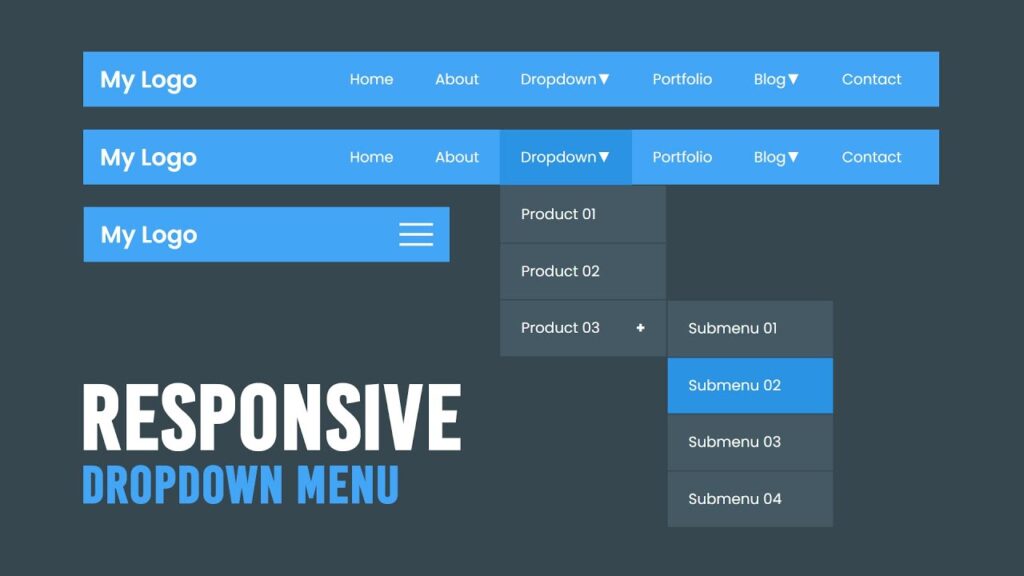

Click For More : https://www.youtube.com/c/OnlineTutorials4Designers/videos?sub_confirmation=1 —————— Enroll My …
source
<!DOCTYPE html>
<html lang="en">
<head>
	<meta charset="UTF-8">
	<meta http-equiv="X-UA-Compatible" content="IE=edge">
	<meta name="viewport" content="width=device-width, initial-scale=1.0">
	<title>Responsive Dropdown Menu</title>
	<link rel="stylesheet" type="text/css" href="style.css">
</head>
<body>
	<header>
		<a href="#" class="logo">My Logo</a>
		<div class="menuToggle"></div>
		<nav>
			<ul>
				<li><a href="#">Home</a></li>
				<li><a href="#">About</a></li>
				<li><a href="#">Dropdown <b>▼</b></a>
					<ul>
						<li><a href="#">Product 01</a></li>
						<li><a href="#">Product 02</a></li>
						<li><a href="#">Product 03 <b>+</b></a>
							<ul>
								<li><a href="#">Submenu 01</a></li>
								<li><a href="#">Submenu 02</a></li>
								<li><a href="#">Submenu 03</a></li>
								<li><a href="#">Submenu 04</a></li>
							</ul>
						</li>
					</ul>
				</li>
				<li><a href="#">Portfolio</a></li>
				<li><a href="#">Blog <b>▼</b></a>
					<ul>
						<li><a href="#">Post Link 01</a></li>
						<li><a href="#">Post Link 02</a></li>
						<li><a href="#">Post Link 03</a></li>
					</ul>
				</li>
				<li><a href="#">Contact</a></li>
			</ul>
		</nav>
	</header>
	<script>
		let menuToggle = document.querySelector('.menuToggle');
		let header = document.querySelector('header');
		menuToggle.onclick = function(){
			header.classList.toggle('active');
		}
	</script>
</body>
</html>
@import url('https://fonts.googleapis.com/css?family=Poppins:200,300,400,500,600,700,800,900&display=swap');
*
{
	margin: 0;
	padding: 0;
	box-sizing: border-box;
	font-family: 'Poppins', sans-serif;
}
body
{
	min-height: 100vh;
	background: #36474f;
}
header
{
	position: absolute;
	width: 100%;
	min-height: 66px;
	background: #43a5f6;
	padding: 0 100px;
	display: flex;
	justify-content: space-between;
	align-items: center;
}
header .logo
{
	color: #fff;
	font-size: 1.75em;
	font-weight: 600;
	text-decoration: none;
}
header ul
{
	position: relative;
}
header ul li
{
	position: relative;
	list-style: none;
	float: left;
}
header ul li a
{
	color: #fff;
	font-size: 1.1em;
	padding: 20px 25px;
	text-decoration: none;
	display: flex;
	justify-content: space-between;
}
header ul li a:hover
{
	background: #2b93e3;
}

header ul li ul
{
	position: absolute;
	left: 0;
	width: 200px;
	background: #445964;
	display: none;
}
header ul li:hover > ul
{
	display: block;
}
header ul li ul li
{
	position: relative;
	width: 100%;
	border: 1px solid rgba(0,0,0,0.2);
}
header ul li ul li ul
{
	top: 0;
	left: 200px;
}
/* now, make it responsive */
@media (max-width: 1100px)
{
	header
	{
		padding: 10px 20px;
	}
	header nav
	{
		position: absolute;
		width: 100%;
		top: 66px;
		left: 0;
		background: #445964;
		display: none;
	}
	header.active nav
	{
		display: initial;
	}
	header nav ul li
	{
		width: 100%;
	}
	header nav ul li ul
	{
		position: relative;
		width: 100%;
		left: 0;
	}
	header ul li ul li ul
	{
		top: 0;
    left: 0;
	}
	header nav ul li:hover ul li
	{
		background: #546e7b;
	}
	.menuToggle
	{
		position: relative;
		width: 40px;
		height: 50px;
		cursor: pointer;
		display: flex;
		justify-content: center;
		align-items: center;
	}
	.menuToggle::before
	{
		content: '';
		position: absolute;
		width: 100%;
		height: 3px;
		background: #fff;
		transform: translateY(-12px);
		box-shadow: 0 12px #fff;
	}
	.menuToggle::after
	{
		content: '';
		position: absolute;
		width: 100%;
		height: 3px;
		background: #fff;
		transform: translateY(12px);
	}
	header.active .menuToggle::before
	{
		transform: rotate(45deg);
		box-shadow: 0 0 #fff;
	}
	header.active .menuToggle::after
	{
		transform: rotate(315deg);
	}
}
[download_button link=”https://drive.google.com/uc?export=download&id=13Zf0cuMWhKpG_ds4I9ERMTJTxwTwUbnd”]